Review a live poker hand with AskGTO
Turn your notes into a conversation about a hand. AskGTO is an AI poker coach: enter the cards and actions, read an explanation, and ask about the decisions you want to understand. No exported hand-history file needed.
- Manual hand entry
- Plain-language explanations
- Follow-up questions
One hand. An ongoing conversation.
1 min 46 sec · An actual product walkthrough with a mix of English and Chinese interface labels. The button 深度分析 means Deep Analysis. Prefer reading? All four steps are below.
Silent screen recording, about 5 MB. Loads only when you press play.
How to review a live hand in AskGTO
Start with a hand you want to understand
After your session, choose a hand that left you uncertain. Keep your notes nearby: the stakes, positions, starting stacks, hole cards, community cards, and actions and bet sizes on each street.
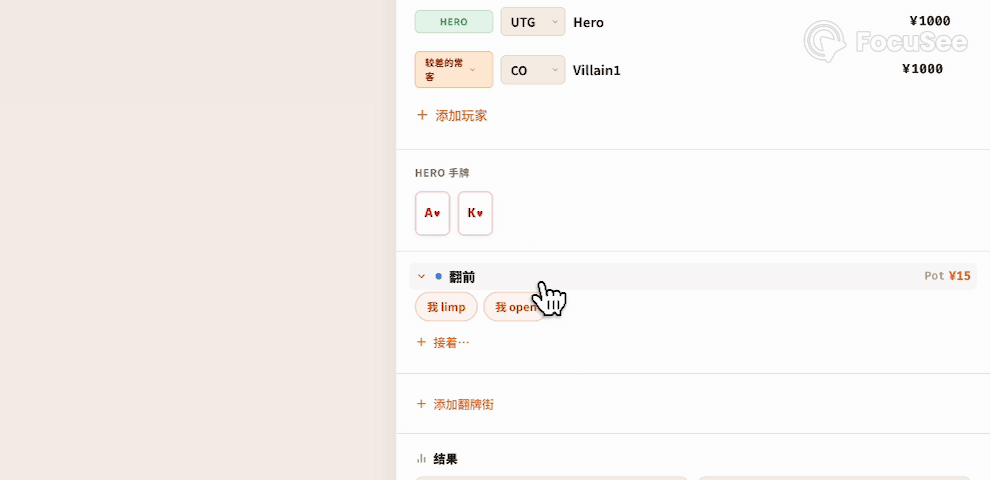
In this demonstration, the player reconstructs an ace-king hand and later asks what hands the opponent could have. The recording illustrates the workflow, not a proof of optimal play.
Reconstruct the hand with the entry tool
Open the hand-entry icon beside the chat input. Add the players, positions, starting stacks, and your hole cards. Then enter the preflop action and add the community cards and actions for each later street.
This walkthrough uses the manual entry tool. AskGTO also supports text, voice, and image input. Check your record against your notes before submitting; explain any details you are unsure about in the conversation.
Request an analysis and read the explanation
Select Deep Analysis (深度分析) at the bottom of the hand-entry form. The hand is sent into the conversation, where AskGTO returns an explanation organized around the hand’s decisions. Start with the decision that prompted your review.
Check that the response has understood the cards and actions correctly, and note any assumptions it makes about the opponent.
Keep asking about the same hand
When an explanation raises another question, continue in the same conversation. In the recording, the player asks:
Villain range here?In other words: what hands could the opponent hold here? AskGTO responds by discussing the opponent’s possible range, so you can explore the reasoning without entering the whole hand again.
Use the explanation as a starting point
AI can misunderstand a hand or reach an incorrect conclusion. Verify important calculations and strategy claims with an appropriate calculator, solver, or qualified coach, making sure the conditions match your hand.
Before you start
Do I need an online hand-history file?
No. Reconstruct the completed live hand using your notes and the manual hand-entry tool. Include the positions, stacks, cards, and actions you remember.
Can I describe the hand instead?
Yes. AskGTO supports text, voice, and image input as well as the structured hand-entry tool. This recording demonstrates the structured entry route.
Is an AI explanation the same as a solver calculation?
No. A conversational explanation helps you study decisions and assumptions. Do not treat it as proof of an exact expected value or an optimal strategy for every situation.
Bring one hand. Start with one question.
AskGTO currently requires an account and a beta invite code. Join the waitlist and we'll email you when a code is available, or register if you already have one.